
“You’ve gotta see my new productivity dashboard,” David said eagerly, patting the chair beside his office computer.
“I… do?” I said, confused, taking the seat next to him.
“Yes,” he said emphatically. “After all, you’re a productivity blogger!”
Over the next hour, David showed me the Notion dashboard he had set up. In it, he could track his personal projects, tasks, timelines, and delivery dates. Each task and project was categorized by type, difficulty, and several other variables. He could use this database to generate views by type, category, and every other variable he coded into the template—which was a lot of them.
No doubt, it was an impressive piece of work. It probably took him at least a dozen hours to design the system and input data about every task or project he’d ever wanted to do.
But all I could think about was how much time he spent putting this system together, time he could have spent getting more important things done.
Spending a dozen hours creating a Notion dashboard — or any productivity software — to track personal tasks and projects certainly feels productive. But before we conclude that it is productive, we must stop and consider what productivity systems are meant to do.
A good productivity system should help you…
- Complete your highest-priority tasks first.
- Identify tasks and projects that you don’t need to do.
- Identify opportunities to delegate things to others, such as employees, teammates, or even partners.
- Minimize the time you must spend waiting, doubling back, or starting over.
- Get a strategic overview of all your responsibilities.
If a productivity system does not do these things for you, it’s not a productivity system, it’s busywork masquerading as productivity.
One great example of a productivity system is the Eisenhower Matrix. The Eisenhower Matrix was created by President Dwight D. Eisenhower, who famously said:
“What is important is seldom urgent, and what is urgent is seldom important.”
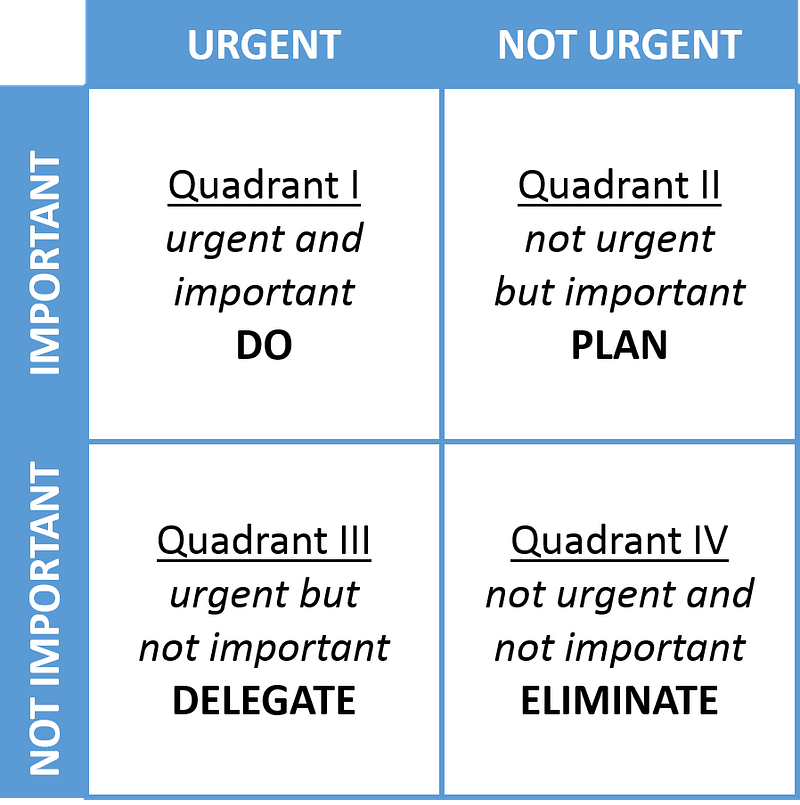 Source: WikiMedia Commons
It’s easy to see how an Eisenhower Matrix might help someone be productive. It has clear criteria for eliminating, delegating, and completing tasks.
However, modern productivity tools often don’t achieve these goals. In fact, they often hinder their achievement.
Consider David and his Notion dashboard. When you look deeply, you see his Notion dashboard is not a productivity tool; it’s a cataloging system. It encourages him to spend hours every week inputting and organizing data about tasks without actually doing them. It does not give him clear criteria for doing, delegating, or eliminating tasks. In the end, organizing such a productivity system is no different than organizing a trading card collection or tending to a farm in Stardew Valley (other than being way less fun).
He’s not the only one with a complex productivity system like this. Countless content creators sell productivity system templates and pepper advertisements for them throughout their content. And for a long time, one of those people with a complex productivity system was me.
How I Wasted 15,000 Hours of My Life on Busywork
In the early 2010's, years before Notion released its first public version and nearly a decade before it became popular, I was into productivity software. Back then, big names included Omnifocus, Asana, David Allen’s Getting Things Done (GTD), and bullet journaling—and I tried them all.
They all had benefits and drawbacks. Some created terrific data visualizations. Others had cross-platform apps that made data entry easy. A few allowed me to share lists or visualizations with others. But no matter what system I tried, they all had one thing in common: maintaining them was a chore. The ‘better’ the system, the more of a chore it was.
I thought it was supposed to feel that way. Everyone says high-achievers spend an hour in the morning planning their day, drinking tea, bullet journaling, or whatever, right? So I gritted my teeth and did my best to work that into my daily routine for nearly a decade.
But it never worked. When I did in-depth reviews every few weeks, I always found I hadn’t done most of my so-called tasks. No matter how diligently I stuck to the system, there were always projects and folders packed with half-cocked ideas that never got off the ground. The important things got done, but only because I stored them in my short-term memory, not because these systems helped me be more productive.
This graveyard of abandoned ideas always filled me with guilt and shame. If I were better, I would have gotten all of this done. So, I would switch to a new system, a better system, and tell myself this time, I’ll get everything done. This time.
Ultimately, it was just a trap of busywork helping me feel more productive without actually being more productive.
What Finally Made Me Realize I Was Wasting My Time
After several years, it became increasingly difficult to adhere to a morning routine that was not bringing me any real-world benefit, so I stopped. My productivity system fields lay fallow, my task and project lists were ignored, and I began working from memory.
But short-term memory alone is a terrible way to manage life, so I began doing what everyone does: Yelling at my phone.
“Hey Siri, remind me to get the groceries after work.”
“Hey Siri, remind me to fill out that paperwork for the state.”
“Hey Siri, remind me to apply for jobs tomorrow afternoon.”
Finally, one morning, after yet again flagellating myself for not adhering to my system, I realized I have two productivity systems. I have the one I thought I should use — a trendy but complicated tool — and the one I used, Apple Reminders.
So, I permitted myself to give up. I dragged Notion, Things, Omnifocus, Todoist, and every other task manager I’ve ever used to my computer’s trash bin and put all my journals back on the shelf. My productivity routine became painfully simple:
- Look at my Apple Reminders Inbox, where Apple adds the random things I yell at it.
- Delete all the useless entries, which are most of them. This includes things that don’t need to be done, things that don’t need to be done anytime soon, and any incomprehensible garbage I don’t even remember adding.
- Give what remains a category and a due date.¹
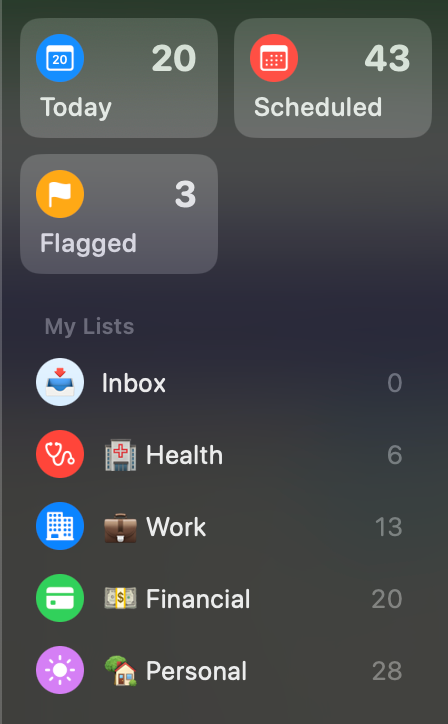 Photo provided by the author. Much of what’s still on here could still stand to be eliminated.
Immediately after making this change, my life improved. Removing the clutter from my phone, computer, and desk made me feel calmer and more accomplished. My task list no longer gives me a panic attack because there are a reasonable number of items on it. I never forget about a task because Apple’s Reminders system won’t let me forget.
How to Simplify Your Productivity System
You don’t necessarily need to abandon your productivity system. Even if you choose to keep using the system you’re using, you can ask yourself whether you’re trying to make it do too much. Some questions to help you consider this include…
- Are you using this system's results? If your software makes Gantt charts, do you reference them when planning? If you use bullet journals, do you use those lists to guide your day? Or, once that information is created, do you shove it in a drawer and forget about it?
- Will you suffer a consequence if you don’t do it? Your task list is a place for things that need to be done. If you start filling it with things you would like to do, you can easily create thousands of tasks for yourself in an afternoon of brainstorming.
- Have you started this project yet? Let’s say you want to remodel your bathroom. Do you have an entire project outlined in your to-do list when you haven’t started? If the tiles are already gone from the bathroom floor, replacing them belongs on your task list, but if your bathroom is currently intact, keep your project planning notes in a notebook instead.
In Conclusion
I don’t blame myself for falling into the trap of productivity tools. It’s human nature to act based on feelings instead of facts. Ultimately, complicated productivity tools replace actual productivity with the feeling of productivity delivered via Kanban boards and Gantt charts.
In Slow Productivity, Cal Newport touches on the idea that productivity gurus evolved this way because that is what bosses like to see. In the absence of an accurate way to measure the value of work, bosses fall back on measuring the appearance of productivity. Anyone who has worked in the knowledge sector in any capacity knows this.
Building on this, productivity gurus are interested in helping their audience do more—more habits, systems, and plans. It’s not a crime to want to get more out of your life, but when friends sit me down on a weekend to show off their personal Notion system as if they’ve done something great instead of spending their entire weekend creating a database that didn’t need to be made, we’ve jumped the rails.
Let’s not pick complicated productivity tools. If you’re not planning a ten-million-dollar project, don’t use tools meant for that. A simple task list will likely be more than enough.
1: Given how few there are, one could even argue that giving my tasks categories is too granular, but I like seeing the categories so I can prioritize based on them, e.g., Health before Finance, Finance before Personal.